









6sense
Embed 6sense insights directly in Gong Engage
About
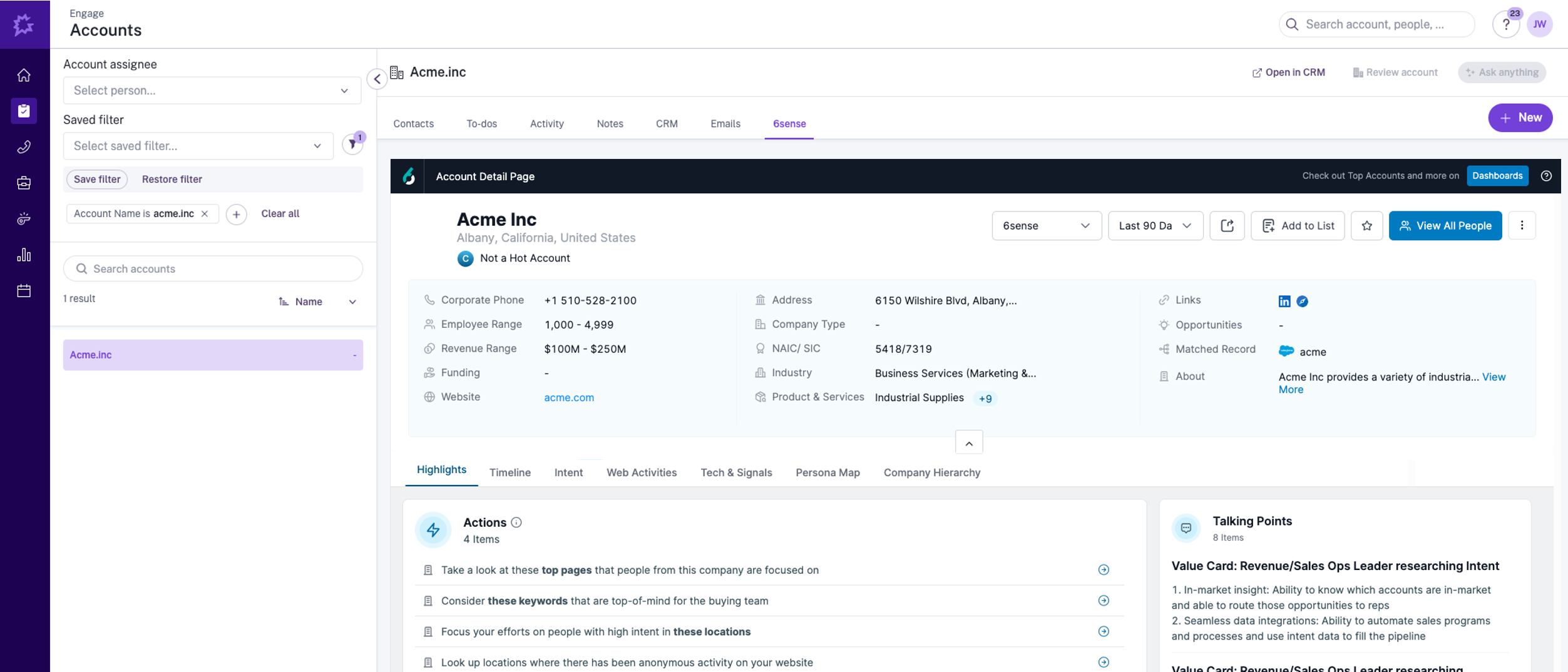
The 6sense Sales Intelligence integration enables users to personalize communications and activate 6sense-collected prospect intent activities in directly from Gong Activity Timelines.
Media
Features

Show 6sense Account Panel in Gong Engage
View 6sense account insights such as de-anonymized website visits, keyword searches, and completed forms - and identify key members of the buying committee from the 6sense Persona Map to better personalize sales outreach with high-value intent signals right from the 6sense tab in the Gong Engage Account Page.
Integration Diagrams
Data
Gong Engage
Gong Engage

Data
6sense Account Insights
6sense Account Insights
Requirements
Subscriptions Required
- Must have 6sense Sales Intelligence subscription
- Must have Gong Engage subscription
Authentication Requirements
To authenticate this integration for the first time, a user must be a Gong Tech Admin and have admin permissions in 6sense
Connect
Navigate to Gong card in 6sense Integration Settings
- Select “Connect”
- Enter Gong OAuth credentials and confirm
- Enable the “6sense Sales Intelligence Configuration” toggle