




Ask Nathan
Every deal has a warm way in. Ask Nathan uses Gong call attendance to show which teammate can open each account.
About
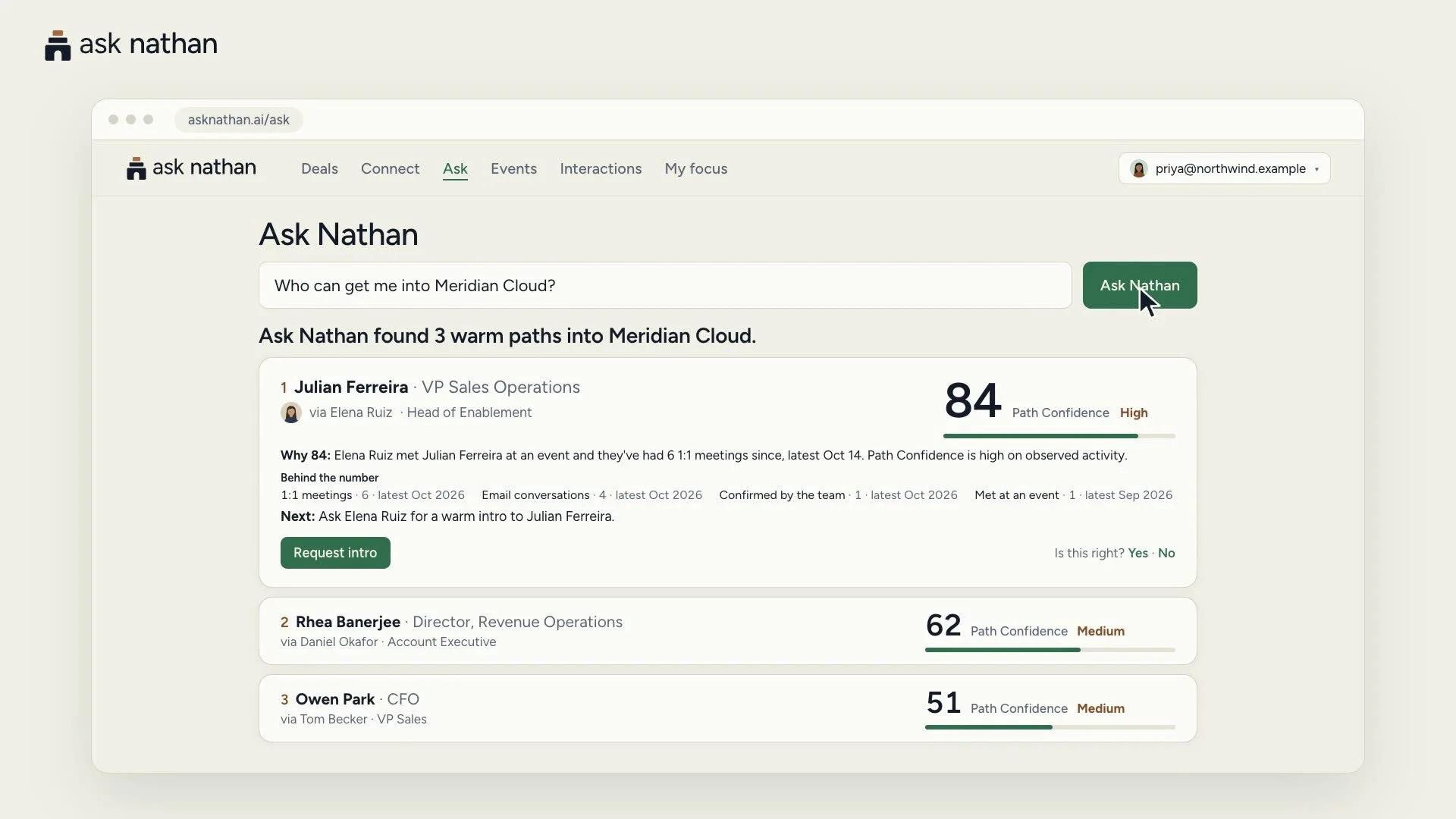
Ask Nathan finds the warm way into every deal. It shows a seller which teammate, partner or investor can introduce them to the people on an account, ranks those paths with a Path Confidence score, and explains why in plain words.
With Gong connected, Ask Nathan counts the calls your team actually attended as relationship evidence: who was on each recorded conference call, when, for how long, and roughly how much each person spoke. A colleague who has been on six calls with your buyer this quarter is a stronger way in than a LinkedIn connection, and Ask Nathan now knows it.
Attendance only. Ask Nathan never reads recordings, transcripts, summaries, topics, trackers, comments or call titles, skips calls marked private, and sends nothing from Gong to any AI model provider.
Media
Features
Use Gong Data in Ask Nathan
Ask Nathan reads who attended each recorded Gong conference call, when, for how long and how much each person spoke, and turns it into relationship evidence. A teammate who has been on calls with a buyer ranks higher as the warm way into that account. Attendance only: never recordings, transcripts, summaries or topics, and private calls are skipped.
Benefits
Walk into every deal warm
Sellers see which teammate has actually been on calls with a buyer, so they ask for a warm introduction instead of sending a cold email. Gong attendance makes those paths more accurate, with no extra work for reps.
FAQ
No. Ask Nathan reads attendance only: who was on each recorded conference call, when, for how long and roughly how much each person spoke. It never requests recordings, transcripts, summaries, topics, trackers, comments or call titles, skips calls marked private, and sends nothing from Gong to any AI model provider.
A Gong technical administrator connects once for the whole workspace and approves Ask Nathan on Gong's own consent screen. To disconnect, turn Gong off on Ask Nathan's Connect page or revoke Ask Nathan in Gong. Ask Nathan revokes access immediately and deletes what it kept from Gong after 30 days unless the workspace reconnects.
Integration Diagrams
Data
Calls (attendance: parties and speaker talk time)
Calls (attendance: parties and speaker talk time)

Data
Relationship evidence (who attended, when, how long)
Relationship evidence (who attended, when, how long)
Requirements
Subscriptions Required
- Gong (any plan with API access)
- An Ask Nathan paid team plan, or the free 30-day Ask Nathan pilot. Gong is included at no extra cost.
Authenticating User Requirements
- A Gong technical administrator connects Gong once for the whole Ask Nathan workspace.
- The administrator signs in to Ask Nathan with a Google or Microsoft work account.
Connect
- A Gong technical administrator signs in to Ask Nathan and opens Connect.
- Under Calls you attended, they choose Connect Gong, enter the company's Gong address, and approve Ask Nathan on Gong's own consent screen. One connection covers the whole workspace.
- Ask Nathan reads call attendance in the background. Each member can choose Leave my calls out at any time.
- To disconnect, turn Gong off on the Connect page or revoke Ask Nathan in Gong. Ask Nathan revokes access immediately and deletes what it kept from Gong after 30 days unless the workspace reconnects.