








Crossbeam
Revolutionize Revenue Attribution and Partner Collaboration
About
Crossbeam is the largest and most powerful Ecosystem-Led Growth platform, trusted by over 19,000 companies to attract, convert, and grow customer relationships via their partner ecosystems.
This integration empowers sellers with Crossbeam Copilot directly in Gong Engage Account Pages and Partnership Leaders with accurate partner revenue attribution in Crossbeam by leveraging Gong Call Data.
This integration empowers sellers with Crossbeam Copilot directly in Gong Engage Account Pages and Partnership Leaders with accurate partner revenue attribution in Crossbeam by leveraging Gong Call Data.
Media
Features

Show Crossbeam Account Panel in Gong Engage
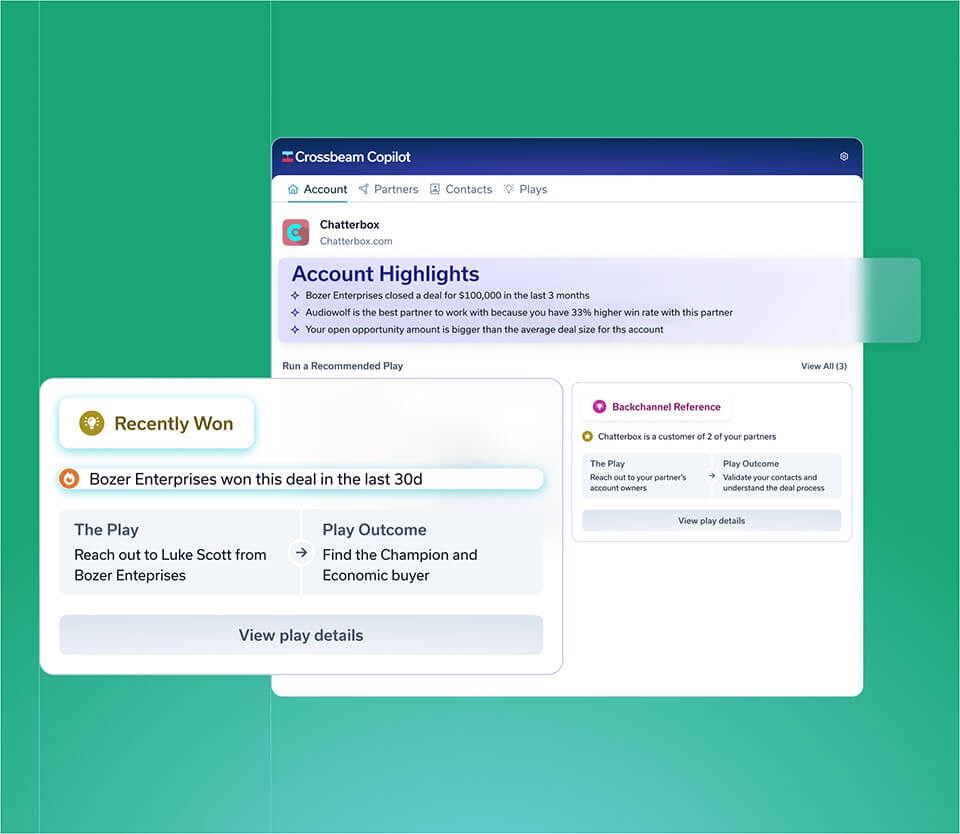
Access proprietary Ecosystem Intelligence and insights from the Crossbeam Tab on Gong Engage Account Pages to close bigger deals, faster.
Crossbeam Copilot for Gong presents the ecosystem insights sellers need to make more informed decisions about how and when to go after target accounts.
Crossbeam Copilot for Gong presents the ecosystem insights sellers need to make more informed decisions about how and when to go after target accounts.

Use Gong Data in Crossbeam
With Gong Call Data in Crossbeam, partnership leaders can accurately attribute partner activities to revenue, understand the impact of partner engagements, and drive better sales outcomes - revolutionizing revenue attribution and partner collaboration.
FAQ
If your Partners have unique company names like "Hooli," we recommend setting up Gong Keyword Trackers. With these additional configuration options, you can fine-tune Gong's ability to identify and catch Partner Mentions effectively.
Once the Gong integration set up is finished, Crossbeam will start to sync 30 days of historical Partner Mentions, as well as continuously monitor every call transcript for future Partner Mentions!
Integration Diagrams
Data
Gong
Gong

Data
Crossbeam
Crossbeam
Requirements
Subscription Requirements
The Activity Timeline integration is available for any customer on Crossbeam Connector or Supernode plans, and for all Gong customers.
The Crossbeam Copilot for Gong integration requires a Crossbeam Supernode plan and Gong Engage subscription.
The Crossbeam Copilot for Gong integration requires a Crossbeam Supernode plan and Gong Engage subscription.
Authentication Requirements
To authenticate this integration for the first time, a user must be a Gong Tech Admin and have admin permissions in Crossbeam
Connect
Head over to the Crossbeam Help Center and follow the simple step-by-step directions to getting started.