






FeatureOS for Gong
Collect feedback, prioritize feature requests, and ship what matters. Feedback boards, roadmaps, release notes, and a help center in one platform.
About
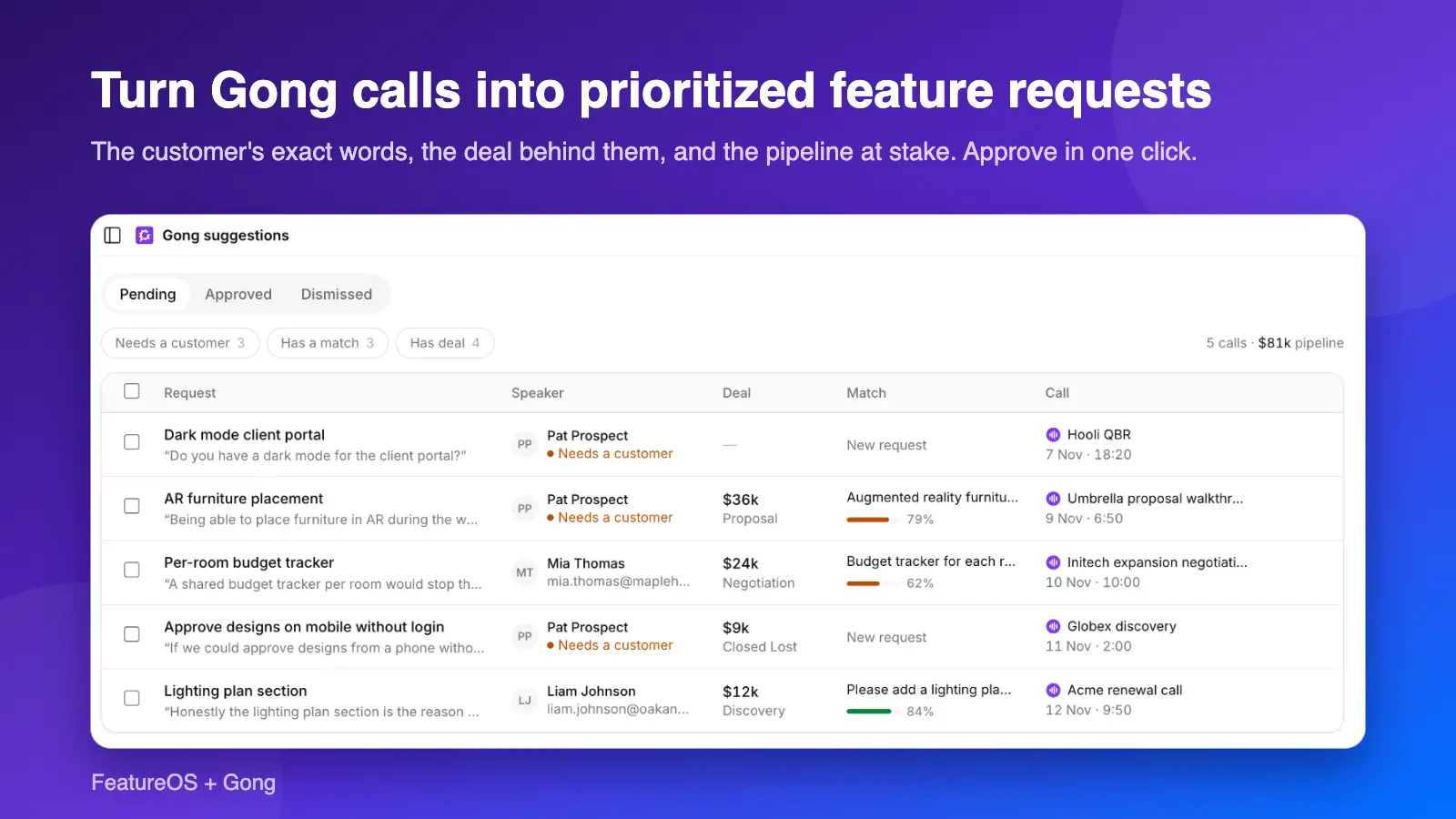
FeatureOS turns what customers say on Gong calls into prioritized feature requests, with the revenue attached. FeatureOS reads your recorded calls, finds the requests customers make, and lists each one in a Suggestions inbox with the customer's exact words and a link to the moment in the call. Your team approves a request as a new post or as a vote on a post you already have. Posts show the open pipeline from the deals behind them, so you build what moves money first. When a request ships, the rep who heard it is emailed so they can go back to the customer. FeatureOS only reads from Gong and stores a short quote, never the transcript.
Media
Features
Use Gong Data in FeatureOS
FeatureOS reads your recorded Gong calls, finds the feature requests customers make, and shows each one with the customer's exact quote, the speaker, a link to the call, and the deal name, stage and amount. Posts then show the pipeline revenue behind them.
Benefits
Build what moves revenue
Every request comes with the customer's own words and the open pipeline of the deals behind it, so product and sales decide with the same facts. When a request ships, the rep who heard it is emailed so they can close the loop.
FAQ
No. FeatureOS only reads from Gong. It keeps a short verbatim quote of each customer request with a link back to the call, and never stores call media or full transcripts. Suggestions are visible only to admins of your FeatureOS organization.
Integration Diagrams
Data
Calls, call parties and transcripts (read)
Calls, call parties and transcripts (read)

Data
Feature request suggestions (short quote, speaker, deal, call link)
Feature request suggestions (short quote, speaker, deal, call link)
Requirements
Connect Gong from FeatureOS
In FeatureOS open Settings, then Integrations, find Gong and click Connect. Sign in to Gong as a technical administrator and click Allow. FeatureOS asks for read-only access to calls, transcripts and users.
Review feature requests from your calls
FeatureOS checks Gong every hour. Open Settings, Integrations, Gong, then Review suggestions to approve or dismiss the feature requests found in your calls. Approved requests become posts or votes with the deal revenue attached.
Connect
In FeatureOS, open Settings, then Integrations, find Gong and click Connect. Sign in to Gong as a technical administrator and click Allow. FeatureOS asks for read access to calls, transcripts and users. It is available on the FeatureOS Growth plan and above.