








InsightStack
Turn scattered customer feedback into clear, prioritized product insights product teams can act on. InsightStack uses AI to surface what matters so you can build what moves the business forward.
About
InsightStack is an AI-powered feedback intelligence platform that helps B2B SaaS product teams automatically capture, analyze, and prioritize customer insights at scale. We transform customer conversations and feedback into structured, actionable signal so product teams can build with confidence.
Media
Features
Use Gong Data in InsightStack
InsightStack connects to your Gong workspace to automatically import call transcripts and surface customer insights without any manual effort.
How it works
Once connected, InsightStack syncs calls from Gong on a continuous basis. Each sync fetches calls recorded since the last run, retrieves their transcripts in batches, and submits each one for analysis against your active feature backlog. Private calls are excluded. Calls already imported are skipped to avoid duplicate analysis.
On the first sync, InsightStack imports calls from the previous 24 hours. Subsequent syncs pick up from where the last one left off.
What gets imported
- Non-private calls within the sync window
- Full turn-by-turn transcripts (speaker-labeled by role order)
- Analyzed against all active features in your backlog
Token management
InsightStack automatically refreshes your Gong access token before it expires, so the connection stays active without requiring you to reconnect.
Manual sync
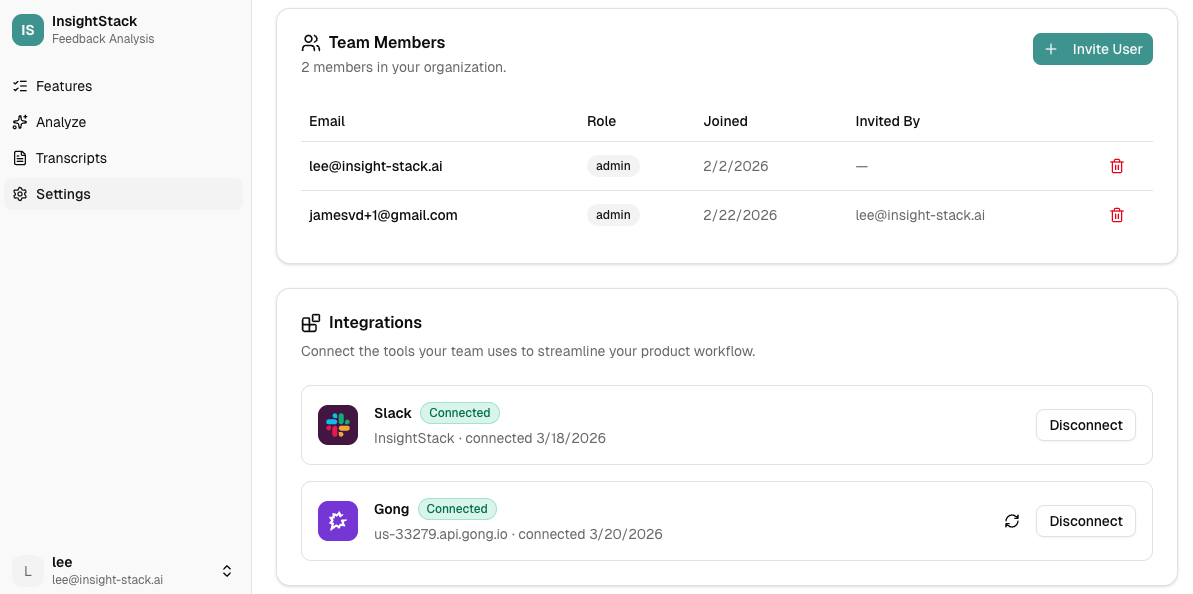
You can trigger an immediate sync at any time from the Gong card in Settings using the refresh icon. This is useful after connecting for the first time or when you want to pull in recent calls on demand.
Benefits
Your backlog, informed by every customer conversation
InsightStack maps Gong call transcripts directly to your active feature backlog — automatically, after every sync. No tagging, no manual review. Customer signal flows into prioritization the moment calls are recorded.
2. Continuous insight, not periodic research
Most tools require you to schedule a research sprint to learn what customers care about. InsightStack listens continuously. Every call adds to a living picture of customer needs, so your priorities reflect what's happening now — not last quarter.
Zero workflow change for your sales and CS teams
Your team keeps recording calls in Gong exactly as they do today. InsightStack works in the background, reading transcripts automatically. No new tools, no new habits, no friction.
FAQ
InsightStack uses a single org-level OAuth token (installed once by an admin), consistent with Gong's auth model. The integration fetches all calls not marked private. InsightStack does not replicate Gong's per-user call visibility rules.
If Gong restricts certain recordings to certain users, those restrictions don't carry over. InsightStack either syncs the call (if the org token can access it) or doesn't. InsightStack consumes only raw transcripts (no Gong AI insights) that we pass through proprietary models.
If Gong restricts certain recordings to certain users, those restrictions don't carry over. InsightStack either syncs the call (if the org token can access it) or doesn't. InsightStack consumes only raw transcripts (no Gong AI insights) that we pass through proprietary models.
Integration Diagrams
Data
Transcript
Transcript

Data
Transcript
Transcript
Requirements
Authenticating User Requirements
To authenticate this integration for the first time, a user must be a Gong Tech Admin and have organization admin permissions in InsightStack.
Subscriptions Required
Must have InsightStack Starter, Growth, or Pro subscription
Must have Gong paid subscription
Requires a separate subscription from InsightStack
Must have Gong paid subscription
Requires a separate subscription from InsightStack
Connect
1. Open Settings. In InsightStack, navigate to Settings from the main navigation.
2. Find the Integrations section. Scroll down to the Integrations card. You will see Gong listed with a "Not connected" badge.
3. Click Connect. Click the Connect button next to Gong. InsightStack will redirect your browser to Gong's authorization page.
4. Authorize InsightStack in Gong. On Gong's authorization screen, review the requested permissions and click Allow. InsightStack requests read-only access to your call recordings and transcripts.
5. You're redirected back. Gong sends you back to InsightStack automatically. You will see a confirmation that your Gong workspace is now connected, and the Gong row will update to show a Connected badge.
That's it. InsightStack will begin importing call transcripts in the background. If you need to trigger an immediate sync, use the refresh icon that appears next to the Disconnect button once connected.
---
If something goes wrong: You will see an error notification explaining the reason (e.g., you denied the request, or the connection timed out). Simply click Connect again to retry.