









Lusha AI Briefer
We build the B2B data and sales intelligence system for revenue teams. Verified contacts, real-world buying signals, and account intelligence - anywhere you work.
Enrich Gong Agents
Lusha enriches Gong's AI agents with real-time company and contact intelligence, so reps always work from accurate, up-to-date account context. When an agent needs decision-maker details, buying signals, or firmographic data to complete a brief or fill a gap in an account record, it calls Lusha's tools directly, no manual lookup required.
Media
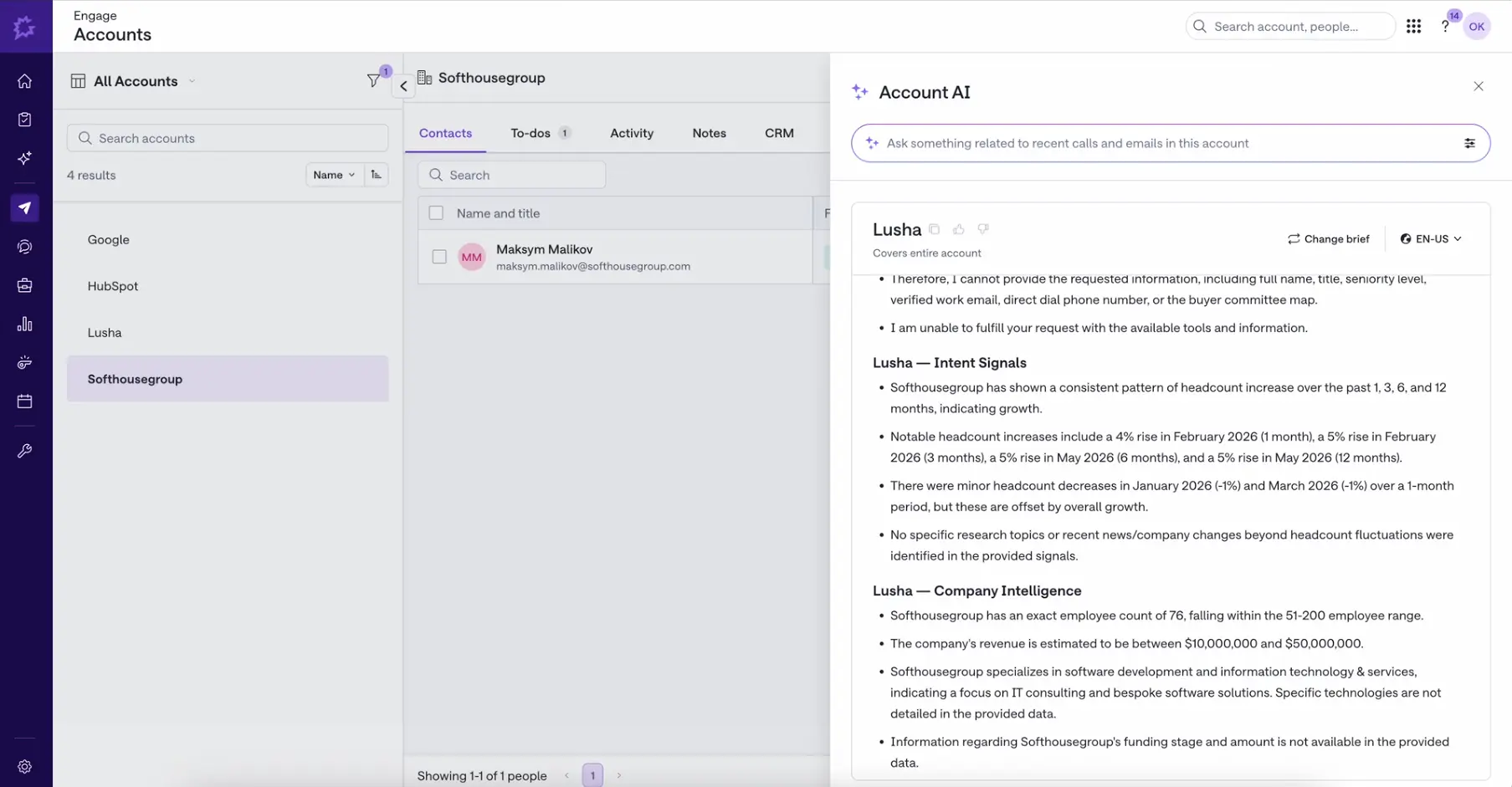
Lusha's AI brief example
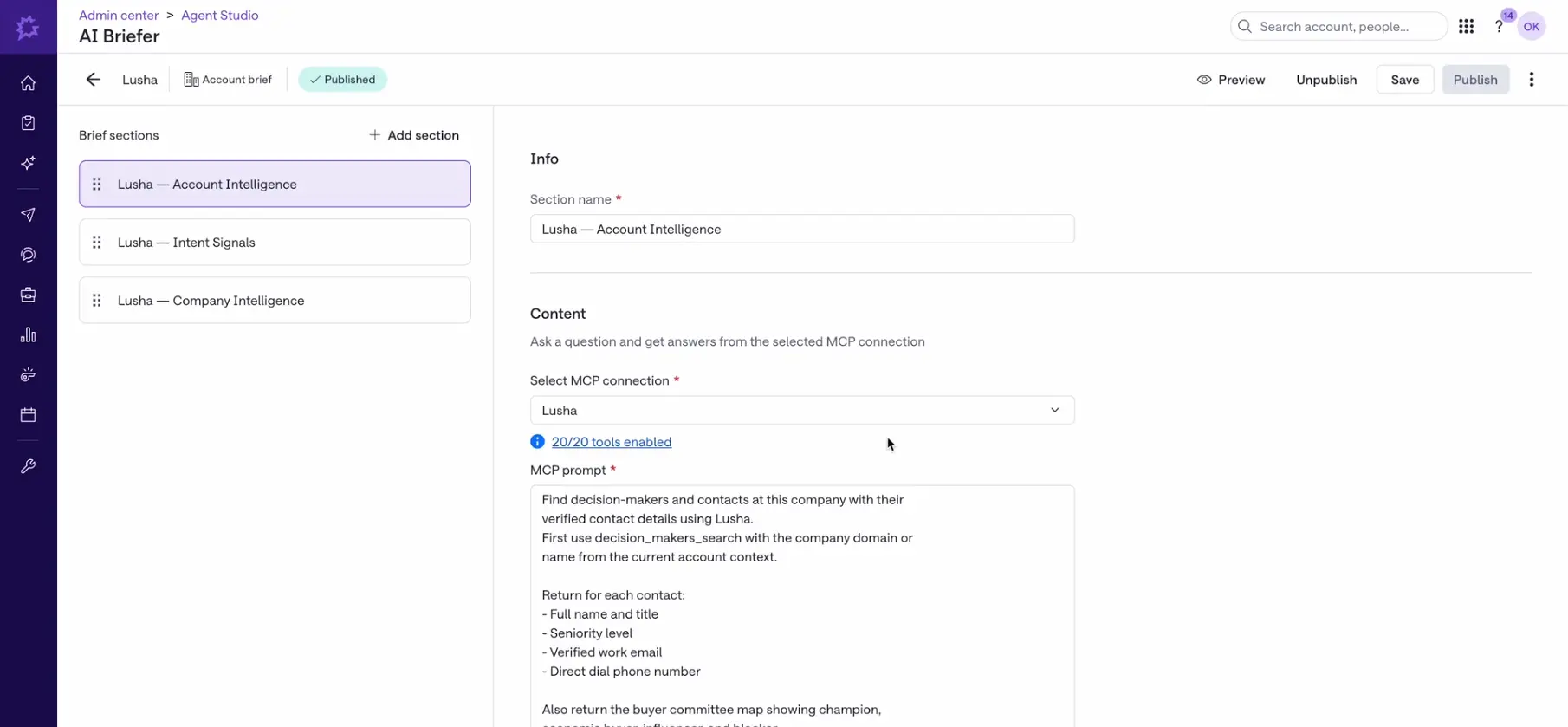
Lusha's AI structured promp...
Available Tools
account_usage
companies_search
contacts_search
lookalike_companies
lookalike_contacts
prospecting_company_enrich
prospecting_company_filters
prospecting_company_search
prospecting_contact_enrich
prospecting_contact_filters
prospecting_contact_search
signals_companies_get
signals_companies_search
signals_company_filters
signals_contact_filters
signals_contacts_get
signals_contacts_search
website_visits_search
companies_search
contacts_search
lookalike_companies
lookalike_contacts
prospecting_company_enrich
prospecting_company_filters
prospecting_company_search
prospecting_contact_enrich
prospecting_contact_filters
prospecting_contact_search
signals_companies_get
signals_companies_search
signals_company_filters
signals_contact_filters
signals_contacts_get
signals_contacts_search
website_visits_search
What You Can Do with this MCP Connection
Lusha's MCP connection brings Lusha's B2B data engine directly into Gong's AI Briefer. Once connected, Gong's Engagement app can pull account intelligence, buying signals, and company data automatically when a rep opens an account, without leaving Gong.
Search and enrich companies and contacts, find decision-makers, pull lookalikes, get intent/buying signals, and manage Lusha tables, all from inside an AI agent or IDE, using natural-language style tool calls instead of hand-coded REST requests.
Search and enrich companies and contacts, find decision-makers, pull lookalikes, get intent/buying signals, and manage Lusha tables, all from inside an AI agent or IDE, using natural-language style tool calls instead of hand-coded REST requests.
Example Prompts
1. Prep the brief (the night before)
- "Using Lusha, brief me for Tuesday's call with Acme: company profile, size, and what's changed there in the last 90 days."
- "Using Lusha, what does Acme run for CRM and sales tooling today?"
- "Look up Dana Okonkwo at Acme and get me her verified work email and direct dial."
2. Find who's missing from the deal
- "Using Lusha, find everyone at Acme in Sales Ops or Revenue Ops at director level and above."
- "Who leads RevOps at Acme, and who do they report up to? Get me titles and seniority."
- "Reveal work emails and direct dials for the people you just found at Acme."
- "Did Dana, or anyone else I know at Acme, get promoted or change jobs recently?"
3. Build the why now
- "Using Lusha, what buying signals are active at Acme right now? Funding, hiring surges, leadership changes, risk news."
- "Has Acme been hiring into RevOps or Sales Ops in the last six months, and in which locations?"
- "Has anyone from Acme visited our website in the last 30 days? How engaged were they?"
- "Which companies visited our website this month with a high engagement score, and who should I contact at each?"
4. After the call
- "Take my closed-won accounts from this year and find me 25 lookalike companies."
- "Here are the eight champions who've bought from us before. Using Lusha, find people like them at my target accounts."
Also useful across the pipeline
- "Using Lusha, find SaaS companies in the UK with 200-1000 employees that already run Salesforce."
- "Enrich those companies with full firmographics so I can see revenue and headcount before I prioritise."
- "Using Lusha, which of my target accounts have had a leadership change in the last quarter?"
- "How many Lusha credits do I have left, and what does a phone reveal cost? Check before you build that list."
FAQ
It's Lusha's implementation of the Model Context Protocol (MCP), an open standard that lets AI agents and tools (like Claude, Cursor, or custom LLM apps) query Lusha's B2B contact and company data directly, without a custom API integration layer.
That's the intent of "configurable prompts", a saved instruction (e.g., a system/tool-call template) that runs the same Lusha MCP query pattern automatically before every briefed call, rather than a rep typing a custom ask each time.
Yes. Because the briefer calls Lusha through MCP (structured tool calls) rather than a fixed API payload, the prompt/instruction layer controls which tools get invoked and with what parameters, so you can configure it to always pull specific fields (e.g., "get decision-maker title, seniority, and most recent signal") rather than a generic enrichment dump.
This app draws from the same credit balance as your Lusha account, at your standard per-action rates (for example, email reveal, phone reveal, enrichment). There is no additional charge for using the app.
Requirements
Subscriptions Required
Must have Lusha free or paid subscription
Authenticating User Requirements
To authenticate this integration for the first time, a user must be a Gong Tech Admin and have user/admin permissions in Lusha.
Connect
- In Gong, go to your MCP connections settings and select Lusha.
- Authenticate your Lusha account (first-time setup requires Tech Admin permissions in Gong).
- Enable the tools you want available to your team and save.