






PartnerOS
Your AI Partner Operating System designed to grow partner sourced revenue, net retention, engagement and adoption.
About
PartnerOS is the AI partner operating system for B2B partnerships teams, built to grow partner-sourced revenue, net retention, engagement and adoption. The Gong integration brings the partner calls already recorded in Gong into PartnerOS, links each call to the right partner, and turns it into a summary, action items and a follow-up email draft.
Media
Features

Use Gong Data in PartnerOS
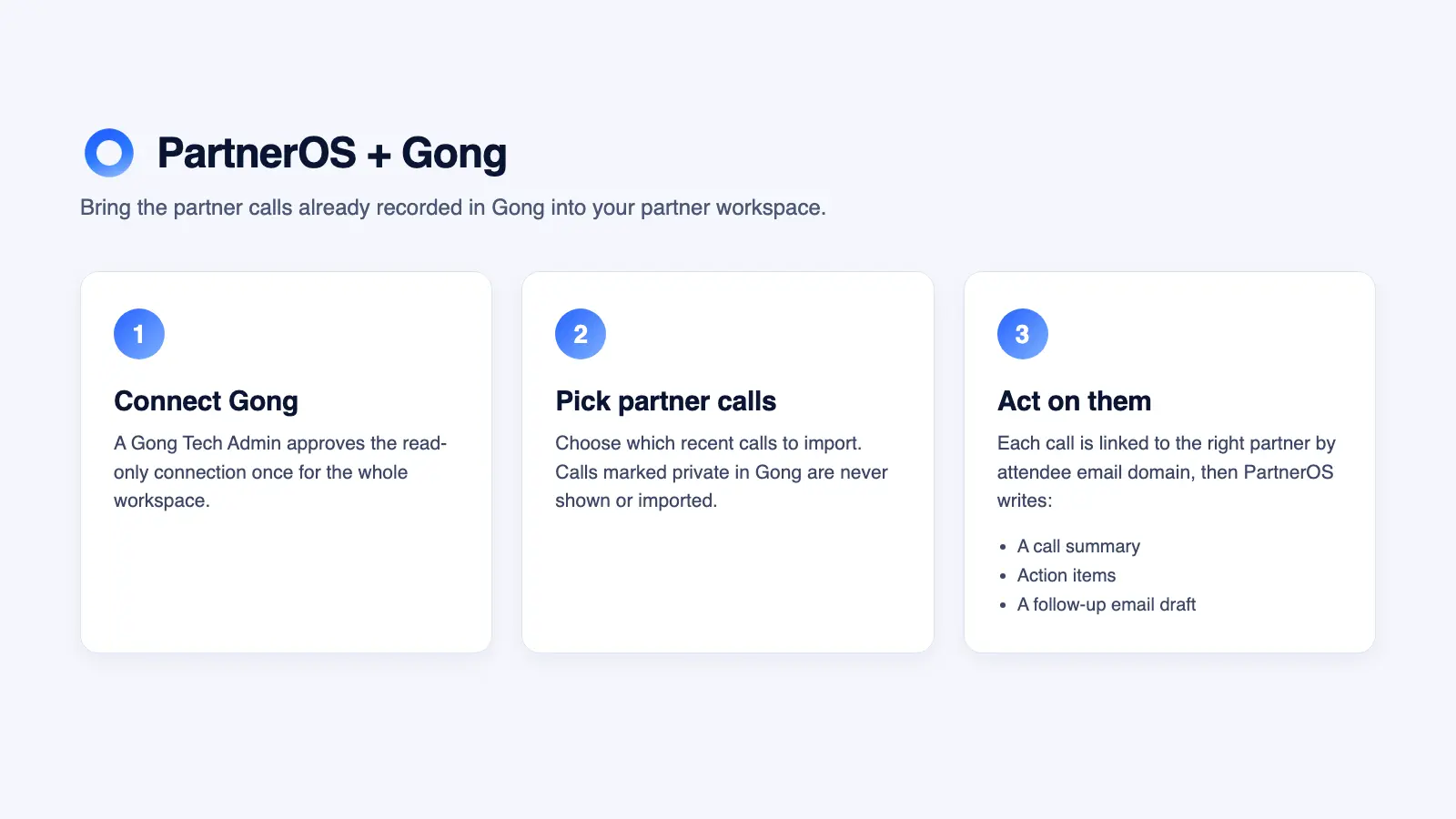
PartnerOS reads the calls already recorded in Gong, with their participants and transcripts, so partner teams can work from them without re-entering anything:
- Choose which recent Gong calls to import (private calls are never listed).
- Each call is linked to the right partner by attendee email domain.
- PartnerOS writes a call summary, action items and a follow-up email draft for that partner.
Read-only: PartnerOS never writes data back to Gong.
Benefits
Every partner call, tied to the right partner
Gong calls are matched to partners by attendee email domain, so partner conversations land on the right partner record instead of staying buried in a rep's call list.
Follow-ups that do not slip
Each imported call gets a summary, action items and a follow-up email draft for the partner, ready for the responsible person to review and send.
Private calls stay private
The connection is read-only, calls marked private in Gong are never imported, and admins can block calls by attendee domain, email or title keyword.
FAQ
No. The integration is read-only. PartnerOS reads calls, participants, transcripts of selected calls and the connecting user, and never writes data back to Gong.
No. Calls marked private in Gong are skipped before they are listed, and their transcripts are never requested or stored.
Only the calls a PartnerOS user selects in Meetings › Import meetings, from the last 90 days. Admins can also block calls by attendee domain, attendee email or title keyword so they are never imported.
Imported calls belong to your PartnerOS organization and are isolated from other customers with row-level security. Inside your organization they follow PartnerOS permissions: a call linked to a partner a member cannot see is not shown to them.
In PartnerOS, open Settings › Integrations and disconnect Gong. Syncing stops immediately, and you can also remove the connection settings there.
Integration Diagrams
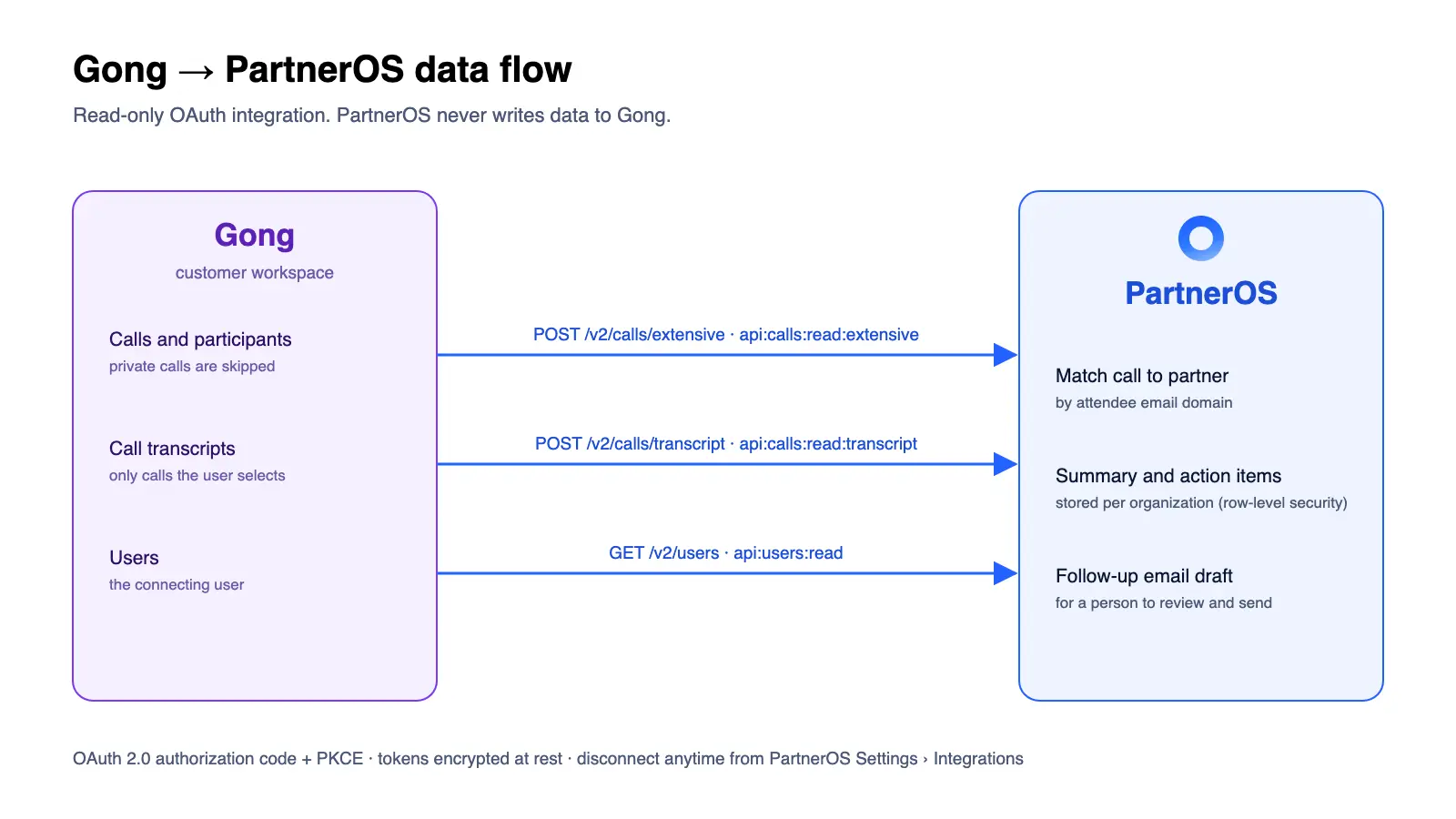
Data flows one way, from Gong to PartnerOS. PartnerOS never writes to Gong.
- Calls and participants (api:calls:read:extensive): lists recent calls so a user can choose which to import, skips calls marked private, and matches each call to a partner by attendee email domain.
- Call transcripts (api:calls:read:transcript): fetched only for the calls the user selects, then used for the summary, action items and follow-up draft.
- Users (api:users:read): identifies the Gong user who authorized the connection.
Imported data is stored per PartnerOS organization and isolated with row-level security. OAuth tokens are encrypted at rest.
Data
Call transcripts
Call transcripts
Users
Users

Data
Meetings linked to partners
Meetings linked to partners
Meeting transcripts, summaries and action items
Meeting transcripts, summaries and action items
Gong connection owner
Gong connection owner
Requirements
Authenticating User Requirements
A Gong Tech Admin authorizes the connection once for the whole Gong workspace. In PartnerOS, the person connecting must be signed in to the organization; the Call recording page where Gong is connected is available to owners and admins.
Subscriptions Required
An active PartnerOS subscription. The Gong integration is included on every PartnerOS plan at no additional fee.
Connect
- In PartnerOS, open Admin › Call recording (or Settings › Integrations) and click Connect on the Gong tile.
- Sign in to Gong as a Tech Admin and approve the read-only access PartnerOS requests (calls, transcripts and users).
- Back in PartnerOS, open Meetings › Import meetings and choose which recent Gong calls to import. Calls marked private in Gong are never listed.