






Quill
Quill reads Gong meetings and transcripts to keep CRM records accurate.
About
Quill keeps your CRM data clean. It finds duplicate accounts and contacts, broken account hierarchies, and records filed in the wrong place, then fixes them once your team approves.
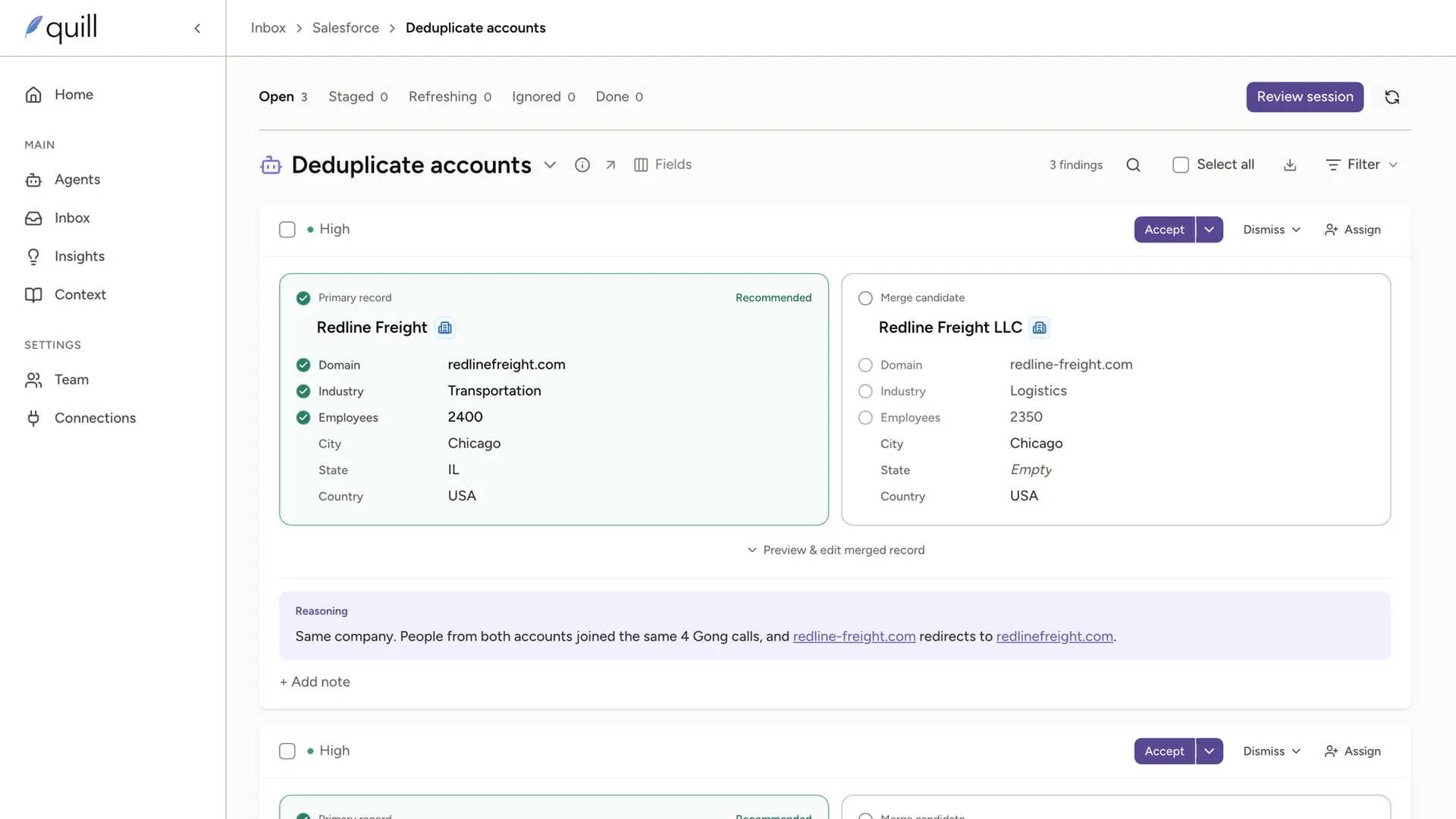
With the Gong integration, Quill checks your CRM against the people who actually join your calls. It adds buyers who are missing from your CRM and spots accounts that are really the same company, so your calls stay linked to the right records.
• Read-only: Quill never creates, changes or deletes anything in Gong
• Private calls are excluded
• Your data is used only for your own CRM, never shared or used to train models
Media
Features
Check your CRM against Gong calls
Quill uses who joined each Gong call to add missing contacts and spot accounts that are really the same company. Your team approves each fix before it reaches your CRM.
Benefits
A CRM that matches who you talk to
Buyers who join your Gong calls but aren't in your CRM become suggested contacts on the right account, and duplicate accounts are flagged for merging.
Read-only and secure
Quill never creates, changes or deletes anything in Gong. Your data is used only for your own CRM, and admins can disconnect anytime from Quill or Gong.
FAQ
A Quill admin, signing in to Gong as a Gong Technical Administrator. Gong authorizes apps for the whole company, so one connection covers your Gong account.
No. Quill has read-only access and never creates, changes or deletes anything in Gong.
Salesforce, HubSpot, and Attio. If yours isn't listed, please get in touch!
No. Gong keeps logging your calls and updating your deals. Quill fixes the records underneath, like missing contacts and duplicate accounts, so your calls link to the right place.
Integration Diagrams
Data
Calls
Calls
Transcripts
Transcripts
Users
Users

Data
Contacts, leads, accounts
Contacts, leads, accounts
Evidence for fixes
Evidence for fixes
Record owners
Record owners
Requirements
Authenticating User Requirements
To authenticate this integration for the first time, a user must be a Gong Admin and have admin permissions in Quill.
Subscriptions Required
Must have Quill subscription
Must have Gong subscription
Must have Gong subscription
Connect
Requirements: a Quill admin and a Gong Technical Administrator.
1. In Quill, go to Settings > Connections.
2. Find Gong and click Connect.
3. Sign in to Gong as a Technical Administrator and review the requested access.
4. Click Allow. You're returned to Quill, and Gong shows as Connected.
To disconnect, remove Gong in Quill's Settings > Connections, or revoke Quill's access in Gong's admin settings.
Full guide: https://www.tryquill.com/docs/integrations/gong
1. In Quill, go to Settings > Connections.
2. Find Gong and click Connect.
3. Sign in to Gong as a Technical Administrator and review the requested access.
4. Click Allow. You're returned to Quill, and Gong shows as Connected.
To disconnect, remove Gong in Quill's Settings > Connections, or revoke Quill's access in Gong's admin settings.
Full guide: https://www.tryquill.com/docs/integrations/gong