








Never miss valuable customer intelligence in your Gong conversations
Transform scattered customer interactions into actionable customer intelligence, all in one place — giving your product, customer success, and account management teams the power to align, act, and exceed expectations
About
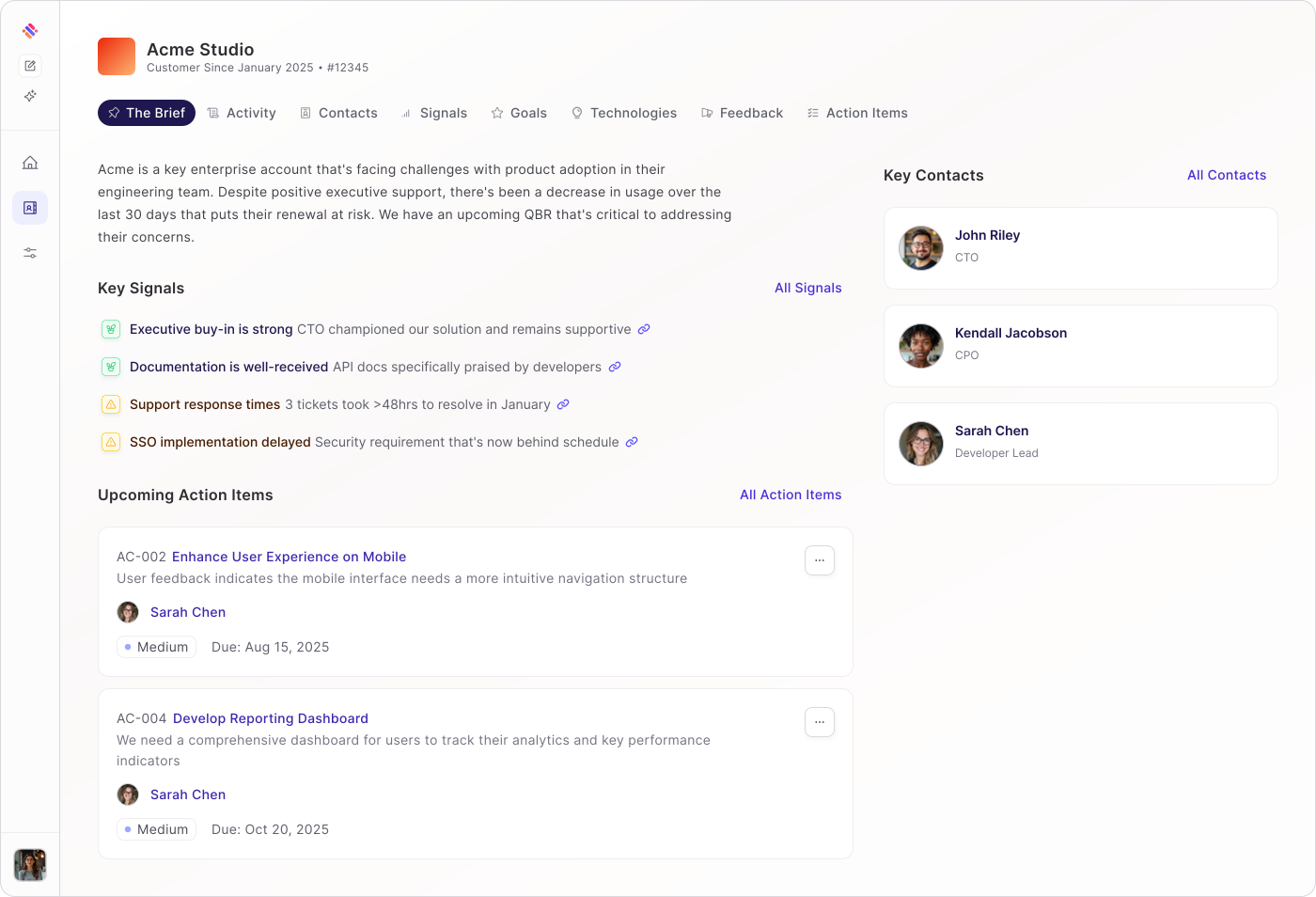
Unlock deeper customer intelligence with the Skrift integration for Gong. With AI-powered analysis of every customer conversation—from onboarding calls to quarterly business reviews and support discussions—your post-sales teams gain instant visibility into account health, emerging risks, and expansion opportunities that drive proactive customer success.
Media
Features
Use Gong Data in Skrift
Use Gong Call data Skrifty AI intelligence directly from Skrift Activity & agentic analysis to empower post sales teams with rich insights required to drive retention and growth.
With Gong Call logs on Skrift Activity timelines, your post sales teams are sure to capture all customer interactions while being alerted to upsell opportunities or potential customer-health risk factors across their book of business.
With Gong Call logs on Skrift Activity timelines, your post sales teams are sure to capture all customer interactions while being alerted to upsell opportunities or potential customer-health risk factors across their book of business.
Benefits

Always On Account Management Assistant
Automatically identify churn risks, expansion signals, and adoption barriers from every customer conversation in Gong

Proactive Customer Success
Transform unstructured call data into actionable intelligence that triggers timely CS workflows and interventions
FAQ
Data syncs in three ways:
- Immediately via webhook when calls complete (if configured)
- Daily automated sync for calls from the past 2 days
- On-demand when you click "Sync Now"
No, each Skrift organization can only connect one Gong account at a time.
Yes! You can select as many workspaces as you need. At least one must be selected.
You can sync calls from any date in the past by adjusting the "From Date" in your settings. However, very large date ranges may take longer to process.
Integration Diagrams
Data

Data
Skrift Activity
Skrift Activity
Requirements
Authenticating User Requirements
To authenticate this integration for the first time, a user must be a Gong Tech Admin and have Admin permissions in Skrift
One or More Workspaces
Skrift can ingest calls and transcripts from one or more of your Workspaces. You'll have the option to select which Workspaces in the Skrift Gong Integration settings.
Connect
For detailed instructions on connecting to Gong, check out the detailed instructions here.