








Telephony Connect for Zoom Contact Center
Bring Zoom Contact Center calls into Gong for a complete view of customer conversations.
About
Integrate Zoom Contact Center with Gong to capture and analyze every customer interaction. Telephony Connect brings Zoom Contact Center calls into Gong, enabling transcription, AI insights, coaching, and visibility across your customer conversations. The result is better visibility into customer interactions, stronger performance across teams, and a more complete view of your revenue and support workflows.
Media
Features

Import Zoom Contact Center Calls into Gong
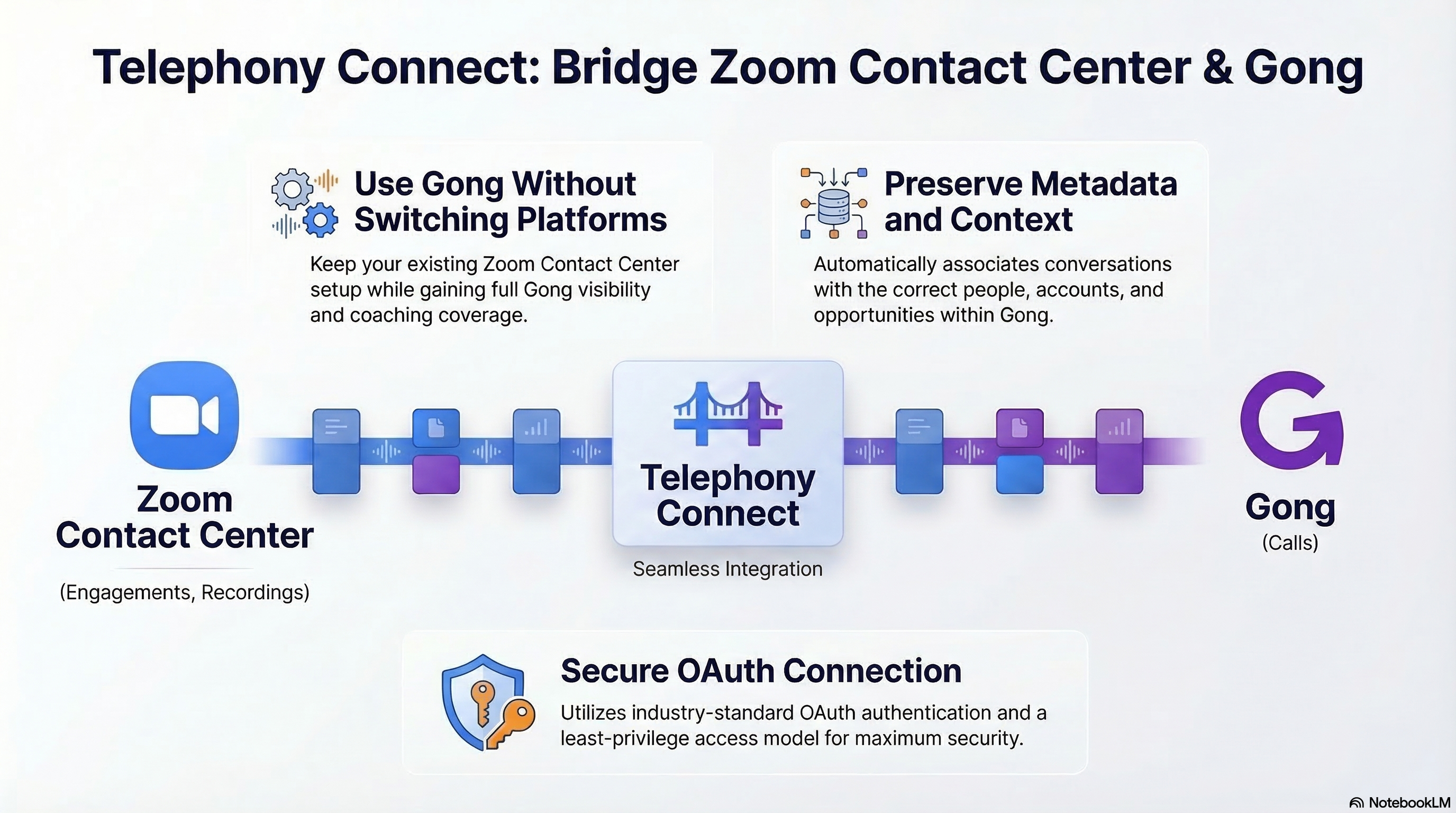
Telephony Connect brings Zoom Contact Center calls into Gong, enabling those conversations to be captured, stored, and analyzed even though Gong does not natively support Zoom Contact Center.

Preserve Participant and Call Metadata
Telephony Connect brings in the participant and call-level metadata Gong needs to associate conversations to the right people, accounts, and opportunities.

OAuth-Based Secure Integration
The integration connects Zoom Contact Center and Gong using industry-standard OAuth authentication, ensuring secure, controlled access.
Benefits

Use Gong with Zoom Contact Center Without Switching Platforms
Telephony Connect allows you to bring Zoom Contact Center calls into Gong even though Gong does not natively support Zoom Contact Center. This lets you keep the contact center platform that already works for your business while still extending Gong across those conversations.
Ensure Calls Are Properly Contextualized in Gong
By bringing in the participant and call-level metadata Gong needs, Telephony Connect helps Gong associate conversations to the right people, accounts, and opportunities where applicable. This makes the calls more useful for search, analysis, and workflow alignment.

Get More Value from Your Gong Investment
By extending Gong to include Zoom Contact Center conversations, Telephony Connect expands the set of interactions your teams can review, analyze, and learn from. This gives teams broader visibility into customer conversations and increases the value of Gong across your business.
FAQ
Telephony Connect for Zoom Contact Center brings Zoom Contact Center calls into Gong through a secure managed integration, allowing teams to capture and analyze customer conversations in Gong even though Gong does not natively support Zoom Contact Center.
Connecting Zoom Contact Center and Gong allows teams to extend Gong across a broader set of customer conversations without switching away from the contact center platform they already use. This gives teams greater visibility into customer interactions and broader coaching coverage across conversations that would otherwise remain outside Gong.
Telephony Connect sends Zoom Contact Center call data into Gong, along with the participant and call-level metadata Gong needs to associate conversations to the right people, accounts, and deals where applicable. This helps make those calls more useful inside Gong for review, search, and analysis.
Yes. Calls brought into Gong through Telephony Connect are treated the same as calls from any other telephony or web conferencing system, whether that system is natively supported by Gong or not. There is no Gong feature limitation simply because the calls originated in Zoom Contact Center rather than a native integration.
Telephony Connect pricing includes a one-time implementation fee and an ongoing subscription based primarily on call volume. Pricing is not based on the number of users, but rather on the volume of calls being processed through the integration. Contact RevOps Sherpas for pricing based on your expected call volume and implementation scope.
Telephony Connect uses a simple, secure installation process based on industry-standard OAuth authentication and a least-privilege access model.
Integration Diagrams
Data
Calls
Calls

Data
Engagements, Recordings
Engagements, Recordings
Requirements
Subscriptions Required
- Gong
- Zoom Contact Center
Authenticating User Requirements
Initial authentication requires a Gong Tech Admin and Zoom Contact Center admin permissions to complete the OAuth connection.
Connect
- Contact RevOps Sherpas to begin your Telephony Connect setup.
- Connect Zoom Contact Center and Gong using industry-standard OAuth authentication.
- Configure call ingestion and mapping into Gong.
- Validate call capture and begin analyzing conversations in Gong.