









Vasco
The RevOps software that turns messy data and siloed forecasts into structured, scalable GTM execution. Trusted by high-growth SaaS teams of all sizes.
About
Vasco is a RevOps platform that integrates CRM, marketing automation, and customer success data to deliver AI-driven analytics, forecasting, and GTM execution for high-growth SaaS teams.
Media
Features
Use Gong Data in Vasco
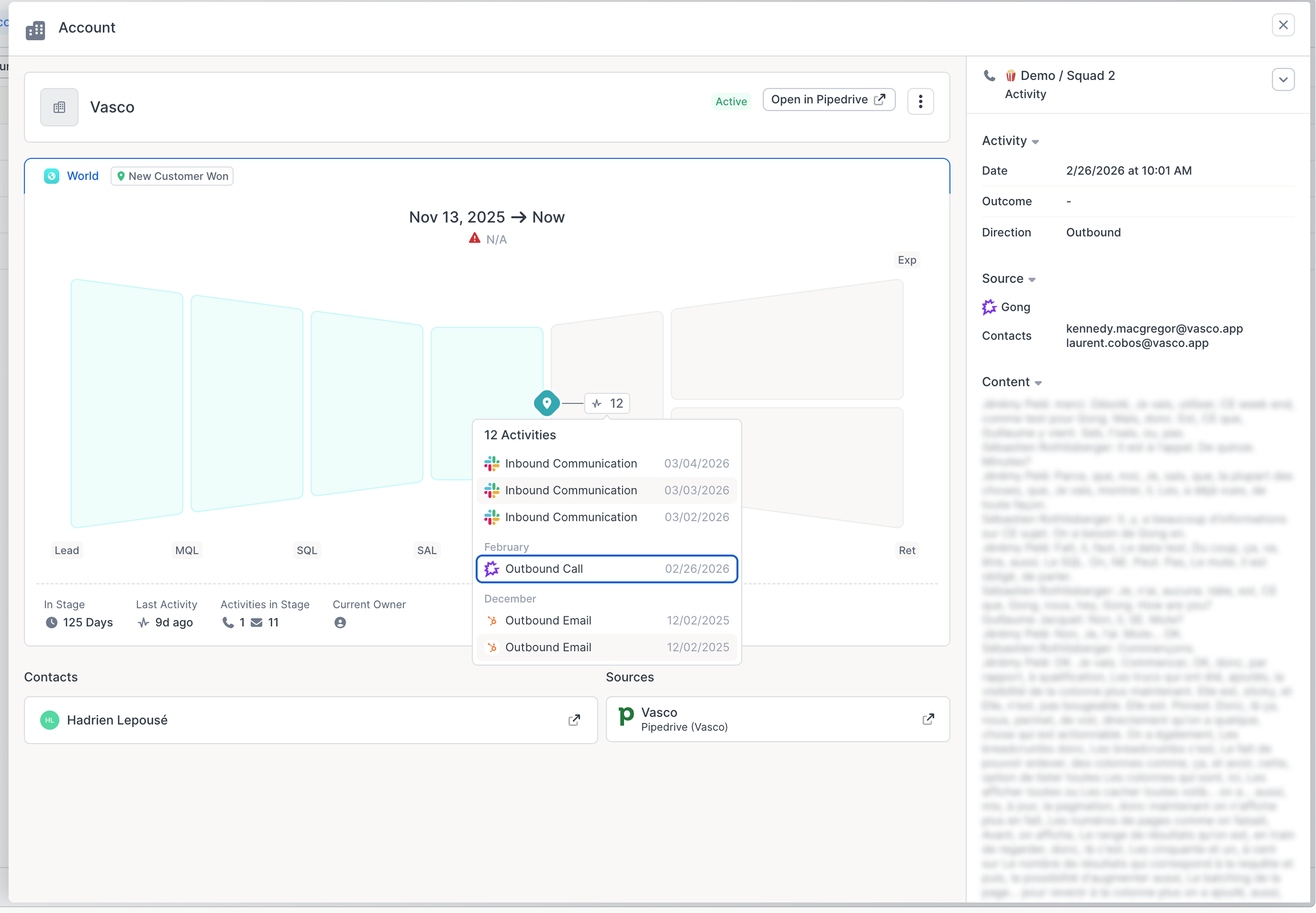
Vasco connects to Gong to bring your customer conversation data directly into your revenue workspace. Once connected, Vasco syncs call transcripts and participant information from Gong. Participants are automatically matched to customer accounts using their email domain, so every call is surfaced in context — linked to the right account in your Data Hub. This allows your team to review conversation history, track communication frequency, and get a full activity timeline per account without leaving Vasco.
Benefits

Gong calls into Vasco
Automatically surface customer call history inside your revenue workspace. Every Gong call is linked to the right account in Vasco's Data Hub based on participant emails, giving your team full conversation context without switching tools.
Transcript analysis for richer performance context
Vasco analyzes Gong call transcripts to enrich the performance metrics in your revenue workspace. Insights drawn from conversations add qualitative depth to quantitative signals — so your team understands not just what the numbers say, but why. Vasco leverages transcript data to analyze account performance across the full customer journey, spanning channels, motions, and functions.
FAQ
The Gong integration is authenticated once at the admin level via OAuth. This means Vasco syncs all call data accessible to the admin who connected the integration. Vasco does not re-apply individual Gong user permissions — access to Gong data within Vasco is governed by your Vasco workspace permissions, not your Gong role. If you want to restrict which Vasco users can see Gong call data, this should be managed through your Vasco workspace settings.
You can disconnect the integration in two ways:
- In Vasco: go to Settings and delete the Gong integration
- In Gong: go to Admin Center > Integrations > Vasco > toggle off "Connection is enabled"
Integration Diagrams
Data
Call
Call

Data
Activity
Activity
Requirements
Authenticating User Requirements
A Gong admin must authenticate the integration on behalf of the workspace. Once connected, all call data accessible to that admin is synced into Vasco.
Vasco User Role Requirements
Only a Vasco admin has permission to connect a Vasco workspace to Gong. This can be done through the Integrations section in Vasco Settings.
Subscriptions Required
No subscription required
Connect
Data Hub > Connect a Source