








Wiza for Gong Engage
Discover 850M+ B2B professionals with real-time verified emails, mobile numbers, and more. Trusted by 350,000+ sales professionals. Sync contacts to your CRM and add them to Gong Engage Flows.
About
Wiza helps sales teams find and enrich B2B prospects with real-time verified emails, mobile numbers, direct dials, job details, company data, and more.
With the Gong Engage integration, teams can build targeted prospect lists in Wiza — including from Wiza Prospect, LinkedIn, or LinkedIn Sales Navigator — sync those contacts to their CRM, and add them to selected Gong Engage Flows. Wiza supports this Gong workflow when Salesforce or HubSpot is connected as the primary CRM.
Key capabilities:
- Build targeted prospect lists in Wiza or import from LinkedIn and LinkedIn Sales Navigator
- Enrich contacts with verified emails, mobile numbers, direct dials, job titles, company details, and more
- Sync contacts to Salesforce or HubSpot, then add them to selected Gong Engage Flows
- Select the target Gong Engage Flow from Wiza during the sync workflow
- Reduce manual data entry between prospecting, CRM, and Gong Engage
- Skip contacts that are already assigned to the same Gong Engage Flow
Media
Features
Prospect List Building
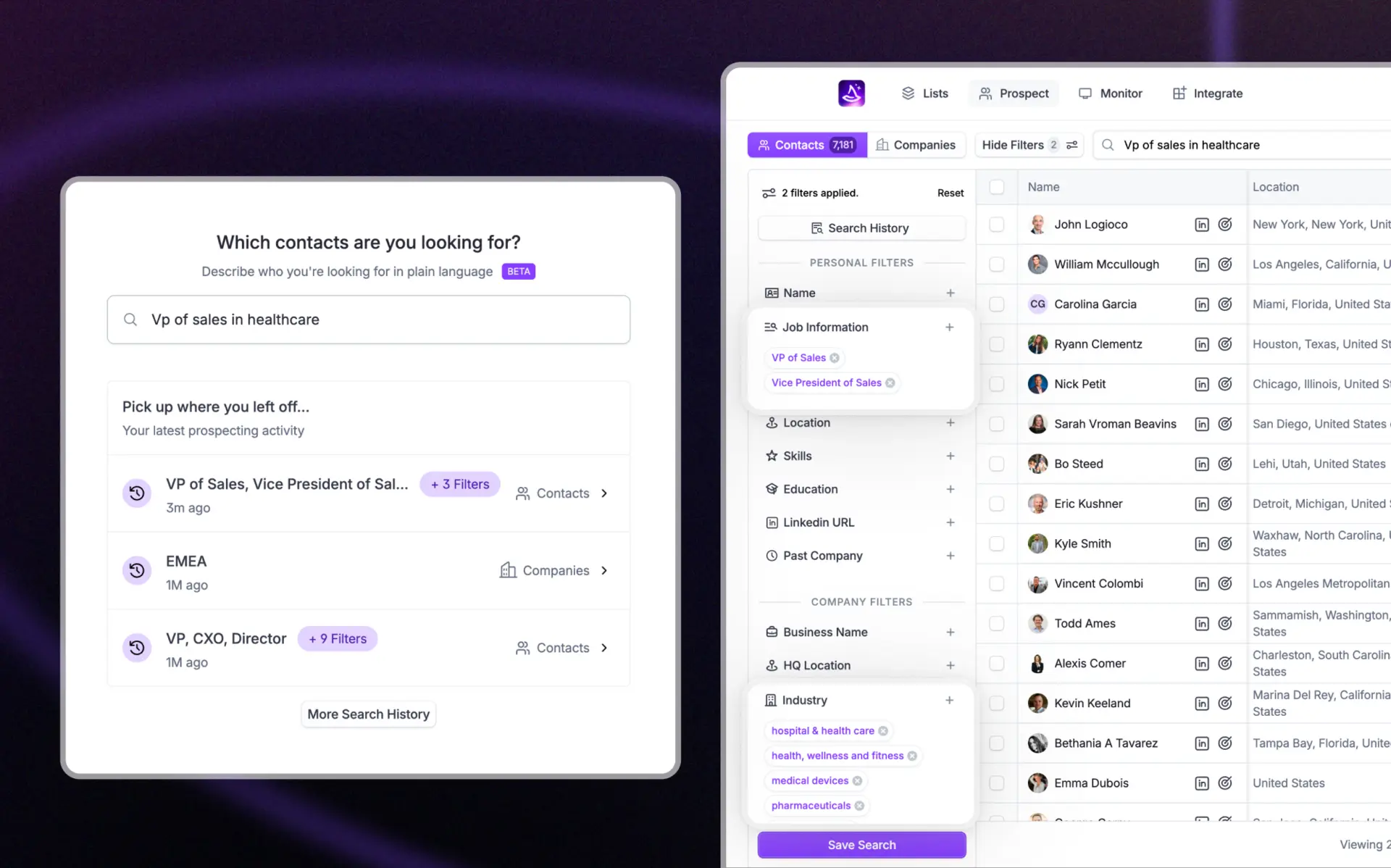
Build targeted prospect lists from Wiza's B2B prospect database using filters such as job title, company, industry, location, company size, revenue, and more. You can also import prospects from LinkedIn and LinkedIn Sales Navigator.
Add Synced Contacts to Gong Engage Flows
Select a Gong Engage Flow in Wiza and add synced CRM contacts to that flow as part of the Wiza sync workflow. Contacts must be synced to Salesforce or HubSpot first, then Wiza adds the corresponding CRM records to Gong Engage.
Rich Contact Enrichment
Enrich prospects with verified emails, mobile numbers, direct dials, job details, company data, and other available fields. Wiza supports 40+ prospecting fields across contact information, job details, work history, company data, and more.
CRM-Connected Gong Workflow
Wiza's Gong Engage workflow is designed to work with Salesforce or HubSpot as the primary CRM. This keeps prospecting data connected to the CRM record Gong Engage uses for Flow assignment.
Benefits
More Meetings, Less Research
Reps spend less time searching for contact data and manually moving records between tools. Wiza helps teams find, enrich, sync, and add prospects to Gong Engage Flows from one workflow.
Cleaner Outreach Data
Wiza verifies email addresses in real time and enriches prospects before CRM sync, helping teams reduce bad data and improve outreach quality before contacts are added to Gong Engage Flows.
CRM and Gong Stay Aligned
Because Wiza adds contacts to Gong Engage using Salesforce or HubSpot CRM records, teams can keep prospecting, CRM, and outreach workflows connected instead of creating separate data silos.
FAQ
Wiza currently supports Salesforce and HubSpot for syncing contacts to Gong Engage. When you add contacts to a Gong Engage Flow, they are routed through your connected CRM, ensuring your CRM, Gong, and outreach data stay in sync.
Yes. Wiza integrates with LinkedIn and LinkedIn Sales Navigator, allowing you to build prospect lists directly from LinkedIn search results or profiles. With Wiza's Chrome extension, you can export contacts from LinkedIn with one click and sync them straight to your Gong Engage Flows.
No. The Gong Engage Flow assignment in Wiza depends on Salesforce or HubSpot CRM record IDs. A supported primary CRM (Salesforce or HubSpot) is required to use the Gong Engage integration.
Yes. Wiza loads available Gong Engage Flows for the connected Gong user and lets you select a Flow during the sync workflow. The selected Flow is applied to the contacts being synced in that batch.
Integration Diagrams
Wiza connects to Gong Engage via OAuth. Users build or import prospect lists in Wiza, enrich contacts, sync them to Salesforce or HubSpot, and optionally add the synced CRM records to a selected Gong Engage Flow. Gong Engage Flow assignment depends on the CRM record ID, so Salesforce or HubSpot must be connected as the primary CRM.
Data
Engage Flows / Prospects
Engage Flows / Prospects

Data
Prospect Lists / Enriched Contacts
Prospect Lists / Enriched Contacts
Requirements
Active Wiza Account
An active Wiza account is required to use this integration. Sign up or log in at wiza.co.
Connect Wiza to Gong Engage via OAuth
In Wiza, navigate to the Integrations tab, select Gong Engage, and click Connect. Wiza will request Gong Engage OAuth permissions to read available Flows, read the connected Gong user, and add CRM prospects to selected Flows.
Salesforce or HubSpot Primary CRM
Gong Engage Flow assignment in Wiza requires Salesforce or HubSpot to be connected and set as the primary CRM integration. Contacts are synced to the CRM first, then added to the selected Gong Engage Flow.
Connect
Connect your Wiza account to Gong Engage in a few steps:
- Log in or create your Wiza account at wiza.co
- Connect Salesforce or HubSpot in Wiza and set it as your primary CRM integration
- Navigate to the Integrations tab in Wiza
- Select Gong Engage and click Connect
- Authorize the Gong Engage connection via OAuth
- Build or import a prospect list in Wiza
- Choose whether to sync contacts to your CRM and add them to a Gong Engage Flow
- Select the target Gong Engage Flow and start the sync
Contacts are synced to your CRM first, then added to the selected Gong Engage Flow using the CRM record.