









Xerpa
Every Rep a Top Performer
About
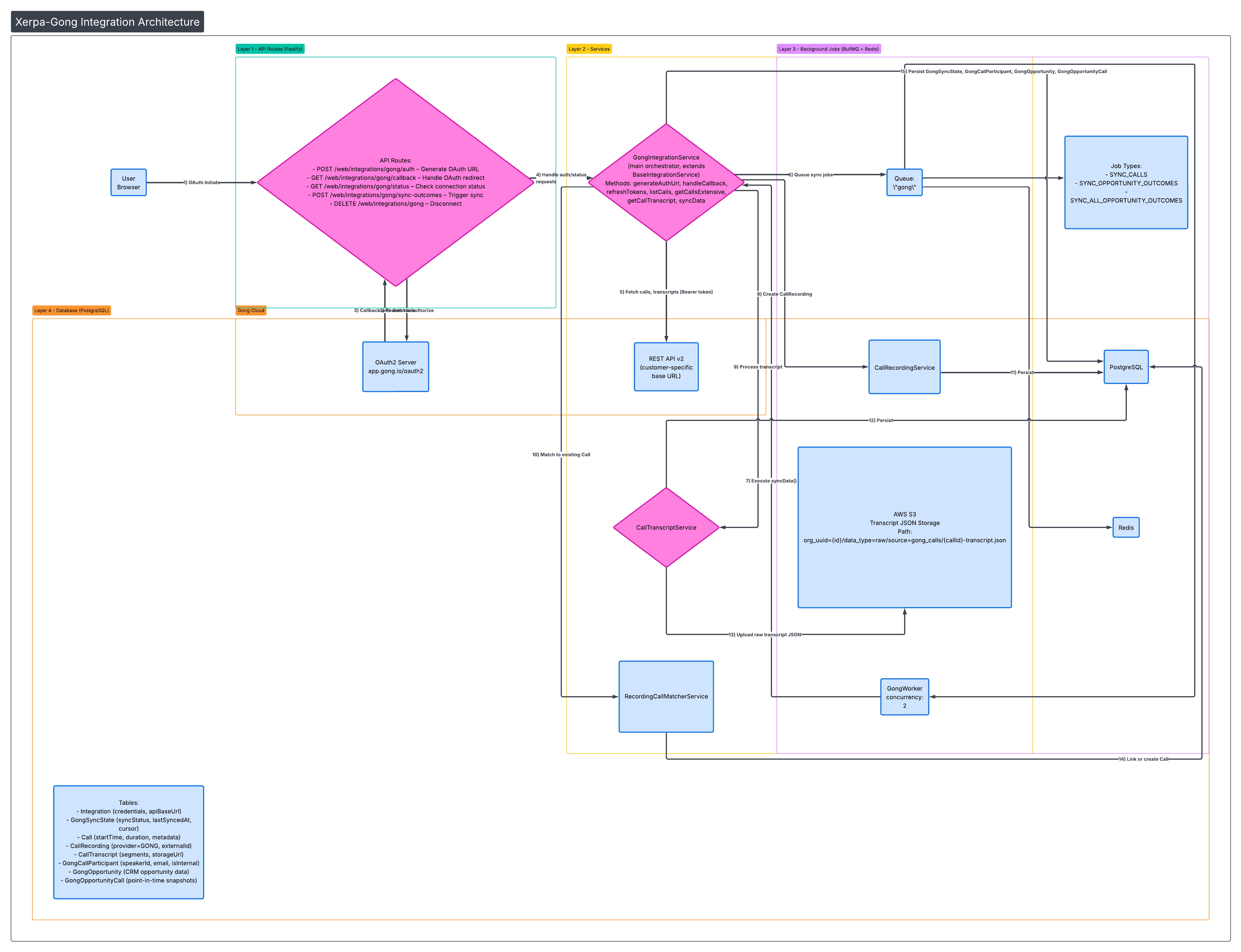
Xerpa AI syncs call transcripts from your Gong workspace at the organization level. Transcripts are used to power AI-driven sales coaching and analytics. Calls marked as private in Gong are automatically excluded and never pulled.
Media
Features
Embed Gong Calls in Xerpa
The Gong integration automatically syncs recorded sales calls and transcripts directly into Xerpa. Once connected, Xerpa pulls call data including conversation transcripts, speaker information, and associated CRM opportunity context—enriching your Xerpa AI coaching experience with real conversation history.
Benefits

Call Transcripts
This allows Xerpa's AI agents to reference actual customer interactions when providing real-time guidance during live calls, making recommendations more relevant and personalized to each deal. The integration runs in the background with incremental syncing, keeping your conversation history current.
FAQ
User attribution is handled via email matching — we match internal call participants to users in our system by their email address to attribute calls for coaching purposes. Org-scoped visibility — all non-private call data is scoped to the organization. We do not replicate Gong's per-user call visibility model; instead we rely on the privacy flag to exclude restricted content, and surface only AI-derived coaching insights (not raw transcripts) to end users.
Private calls are explicitly filtered out using the isPrivate flag from the API — they are never stored or processed.
Integration Diagrams
Data
Call Data
Call Data

Data
Coaching Intelligence
Coaching Intelligence
Requirements
Authenticating User Requirements
To authenticate this integration for the first time, a user must be a Gong Tech Admin and have super admin permissions in Xerpa and Gong
Subscriptions Required
Must have Xerpa paid subscription.
Must have Gong subscription that allows API access
Must have Gong subscription that allows API access
Connect
1. Log in to your Xerpa AI account and navigate to Settings → Integrations.
2. Click "Connect" next to Gong.
3. You will be redirected to Gong to authorize Xerpa AI to access your organization's call transcripts.
4. Once authorized, Xerpa AI will begin syncing your team's non-private call transcripts automatically.
2. Click "Connect" next to Gong.
3. You will be redirected to Gong to authorize Xerpa AI to access your organization's call transcripts.
4. Once authorized, Xerpa AI will begin syncing your team's non-private call transcripts automatically.